What’s New?
You can now mark
any contact form field as required
in the Chat Widget, including custom fields and dropdown fields
. This ensures visitors must provide critical information before starting or continuing a conversation.How It Works:
Go to
Chat Widget Builder > Chat Window
> add fields under Contact Form Options (default or custom) -- Use “Mark the fields you wish to be mandatory”section to select which fields should be required. Default fields are always mandatory to a contact form.
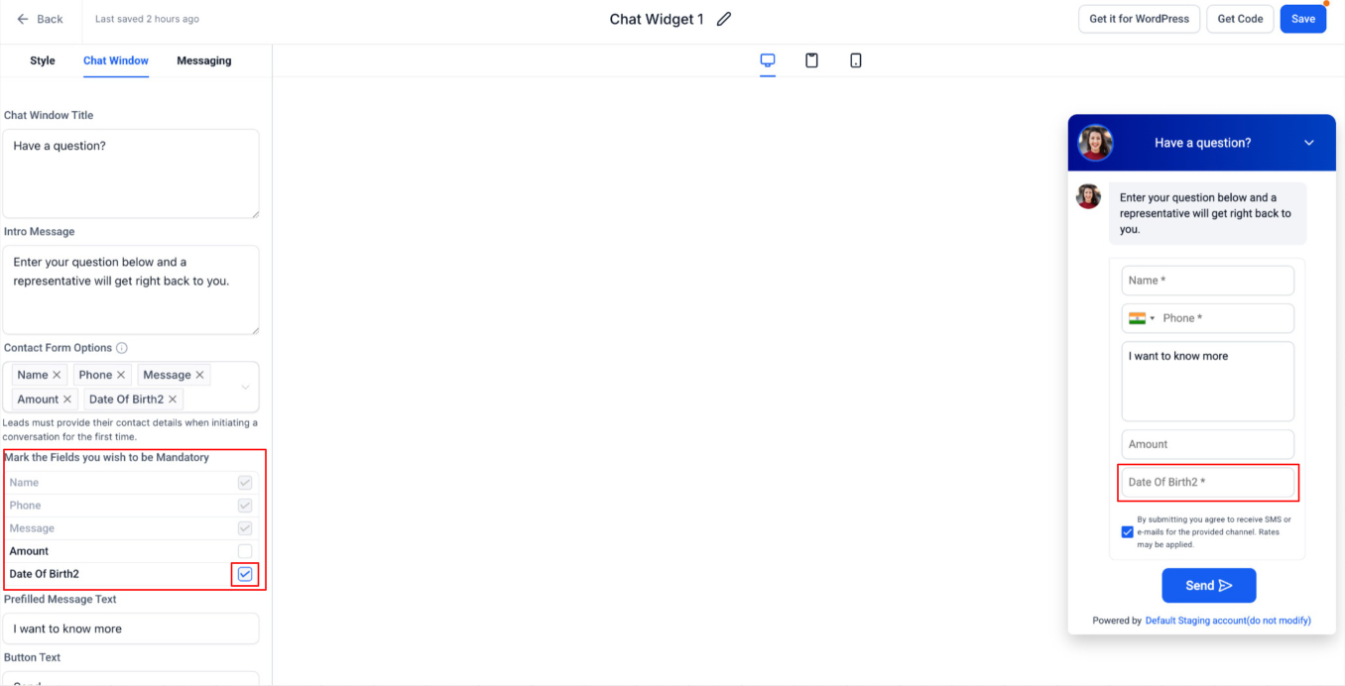
- Required fields are clearly marked with an asterisk (*) in the widget.
- Visitors won’t be able to submit the form unless all mandatory fields are filled.
- When an agent requests contact details from the Conversation Panel (at the account level), visitors are still required to fill all fields marked as mandatory before proceeding.
Why It Matters:
- Prevents incomplete submissions where users skip important fields.
- Ensures workflows, automations, and routing logic always receive the required data.
- Maintains consistent data capture whether details are collected upfront or requested later by an agent.
Notes:
- Applies to custom contact form fields with default contact form fields being always mandatory.
- Mandatory field enforcement applies, when:
- A visitor starts a conversation via the widget
- Contact details are requested by an agent during an active conversation.
- Existing widgets remain unchanged unless fields are explicitly marked as mandatory.
- Screenshots show both states: required vs optional fields.
Was this article helpful?
That’s Great!
Thank you for your feedback
Sorry! We couldn't be helpful
Thank you for your feedback
Feedback sent
We appreciate your effort and will try to fix the article